


Evolving
The Enterprise
Security Ecosystem
A holistic product design journey for Uniqkey, a B2B security platform. This case study unifies three key initiatives—redesigning access points, streamlining 2FA protocols, and establishing admin-employee communication channels—to balance robust protection with intuitive usability.
SaaS
B2B
Cyber Security
2FA
Access Management
Enterprise UX
CRM
Project Scope Note
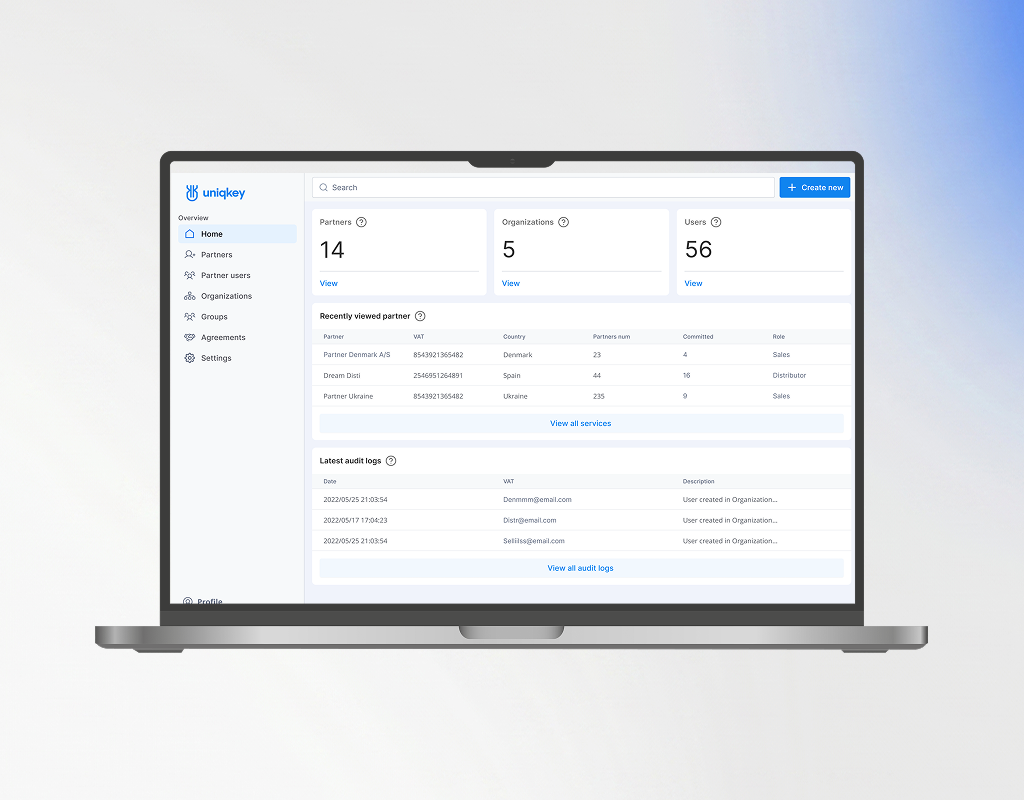
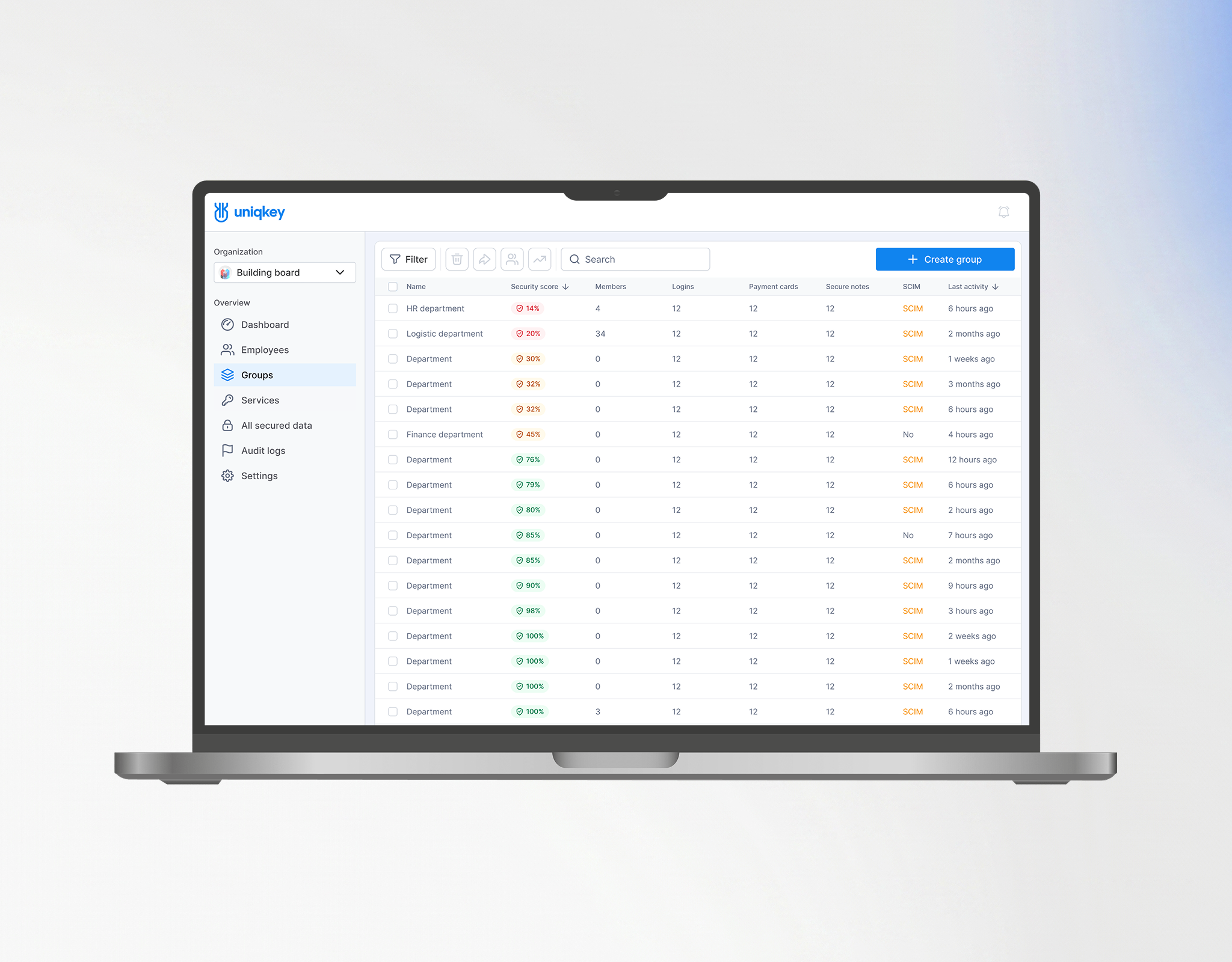
While this story highlights the challenges of designing the Admin Panel and Mobile App, the complete product is a comprehensive multi-platform suite.
I served as the Lead Designer for all components of the platform:

REDESIGNING ACCESS TO
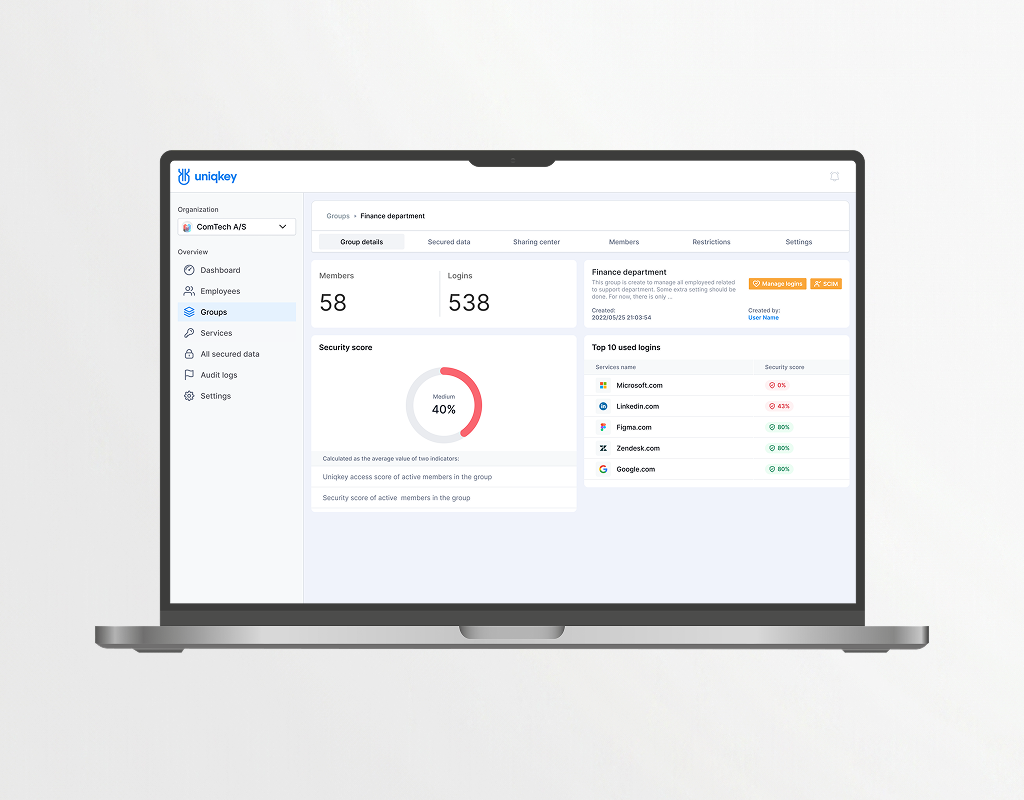
THE MANAGEMENT DASHBOARD
90% of cyberattacks start with email, and poor access management creates security risks, especially in B2B. Uniqkey automates control, reducing errors and strengthening cybersecurity. As hybrid work and cloud adoption grow, demand for such solutions rises.

These managers handle:
Admin Panel is widely used by managers in:
01
KEY RESPONSIBILITIES
The primary user of Uniqkey's Admin Panel is the company administrator, responsible for ensuring secure and efficient access management across
the organization.

Centralized access control
Easy creation, assignment, and monitoring of corporate service access.

Automated onboarding / offboarding
Swift employee management with minimal data breach risks.

Passwordless authentication
Enhanced security through SSO and 2FA via mobile app.

Security monitoring & audits
Activity tracking, role management, and quick response to threats.

Minimized password leakage risk
Eliminates manual password entry and sharing.
02
Discovery and Research
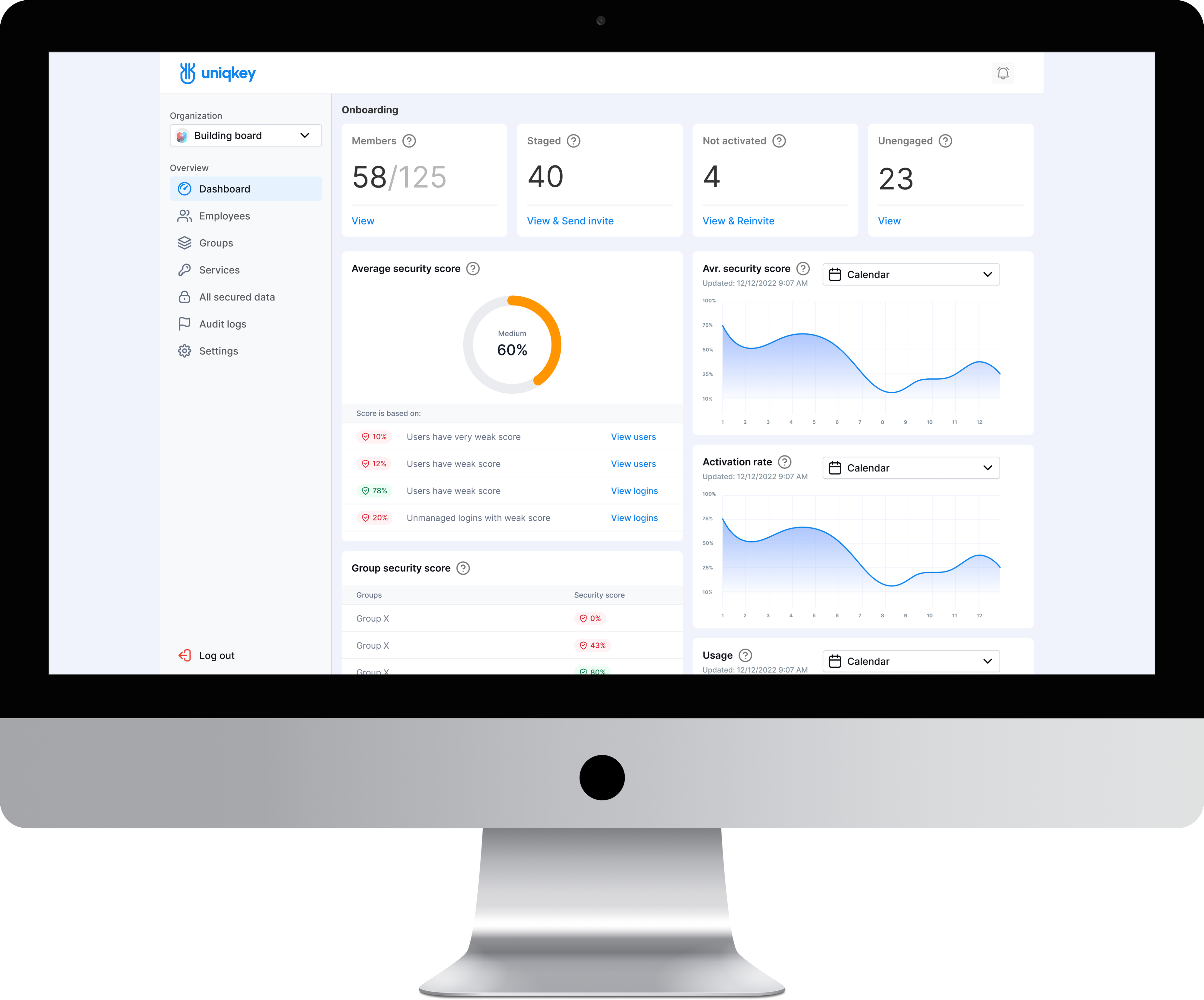
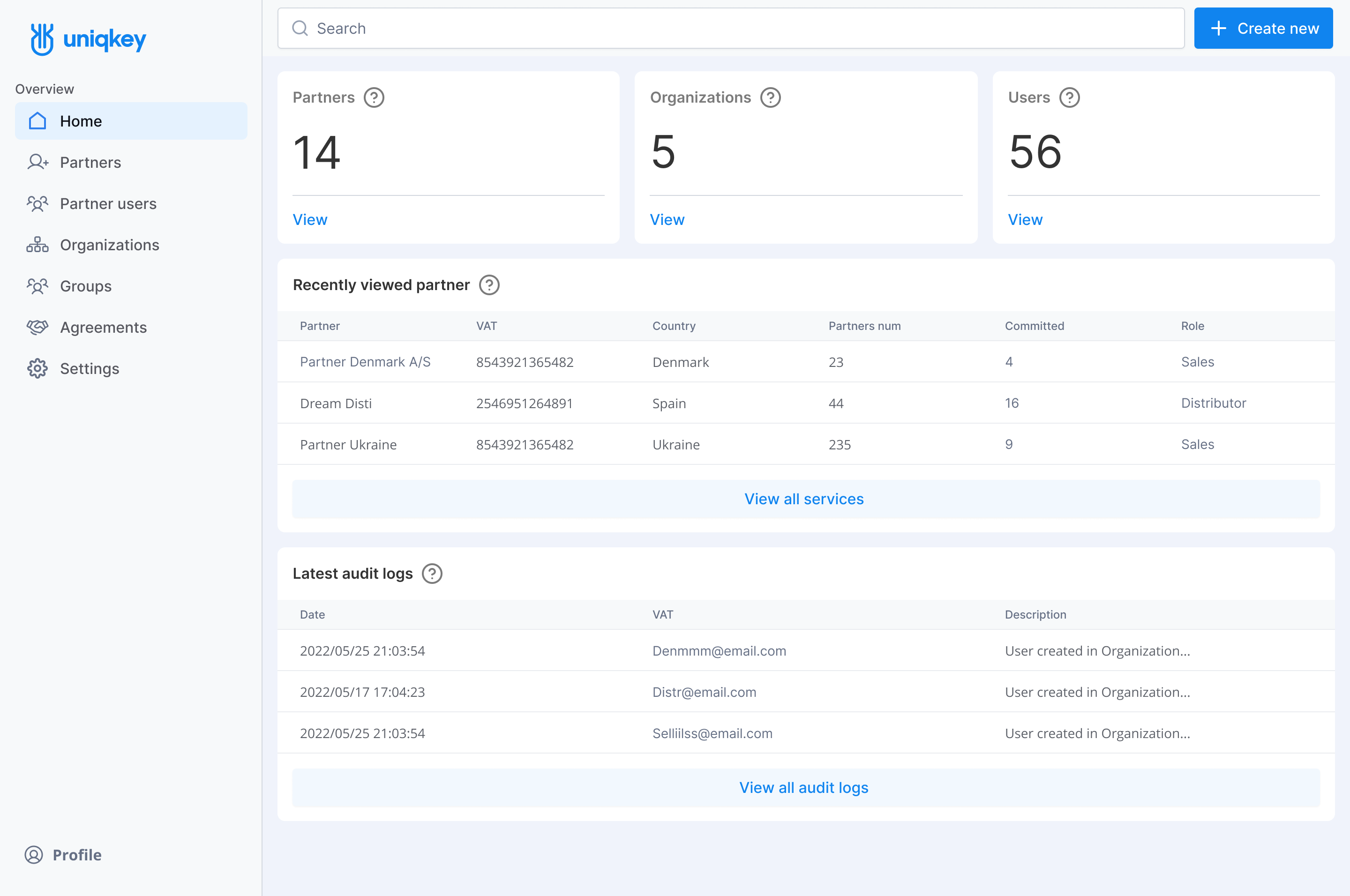
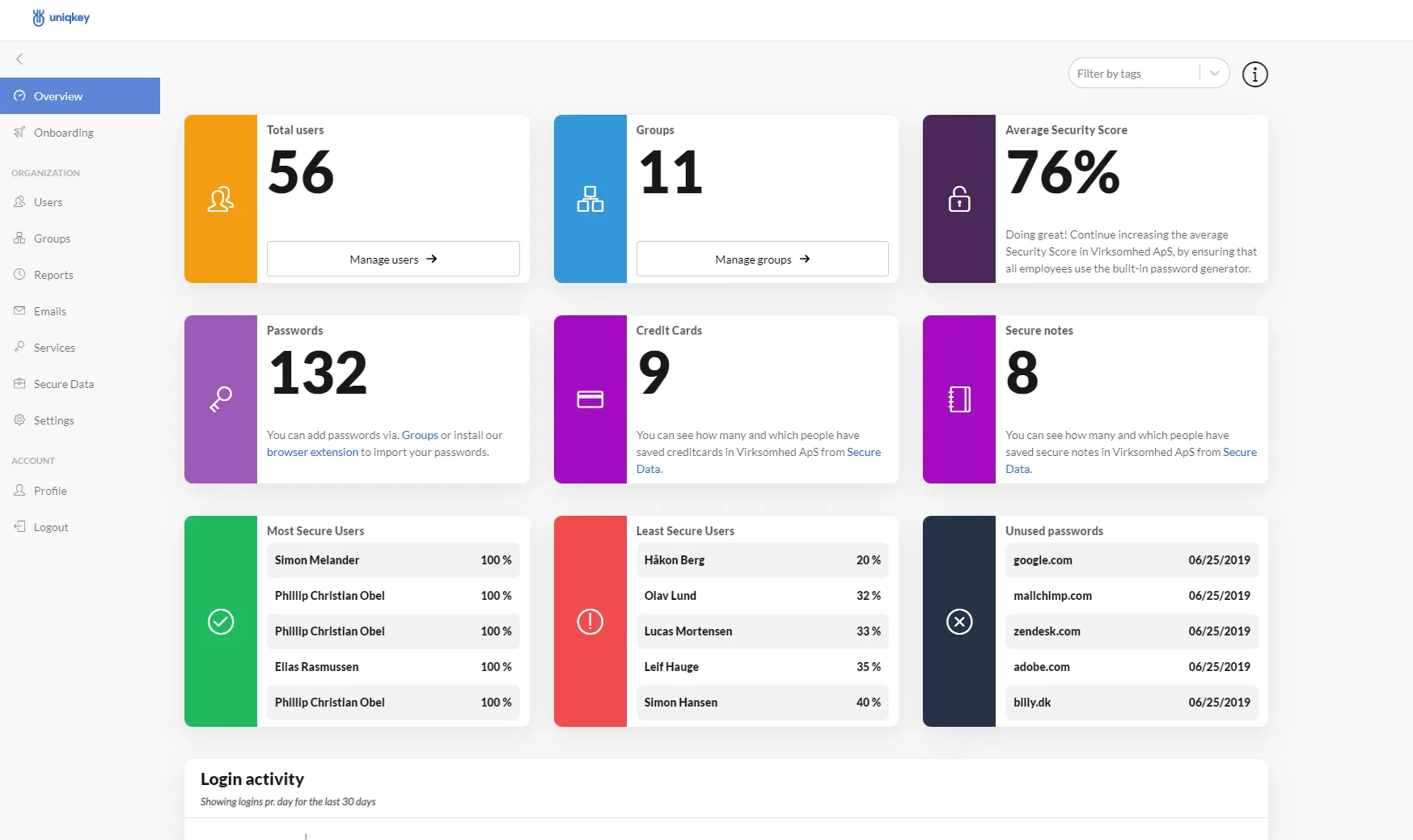
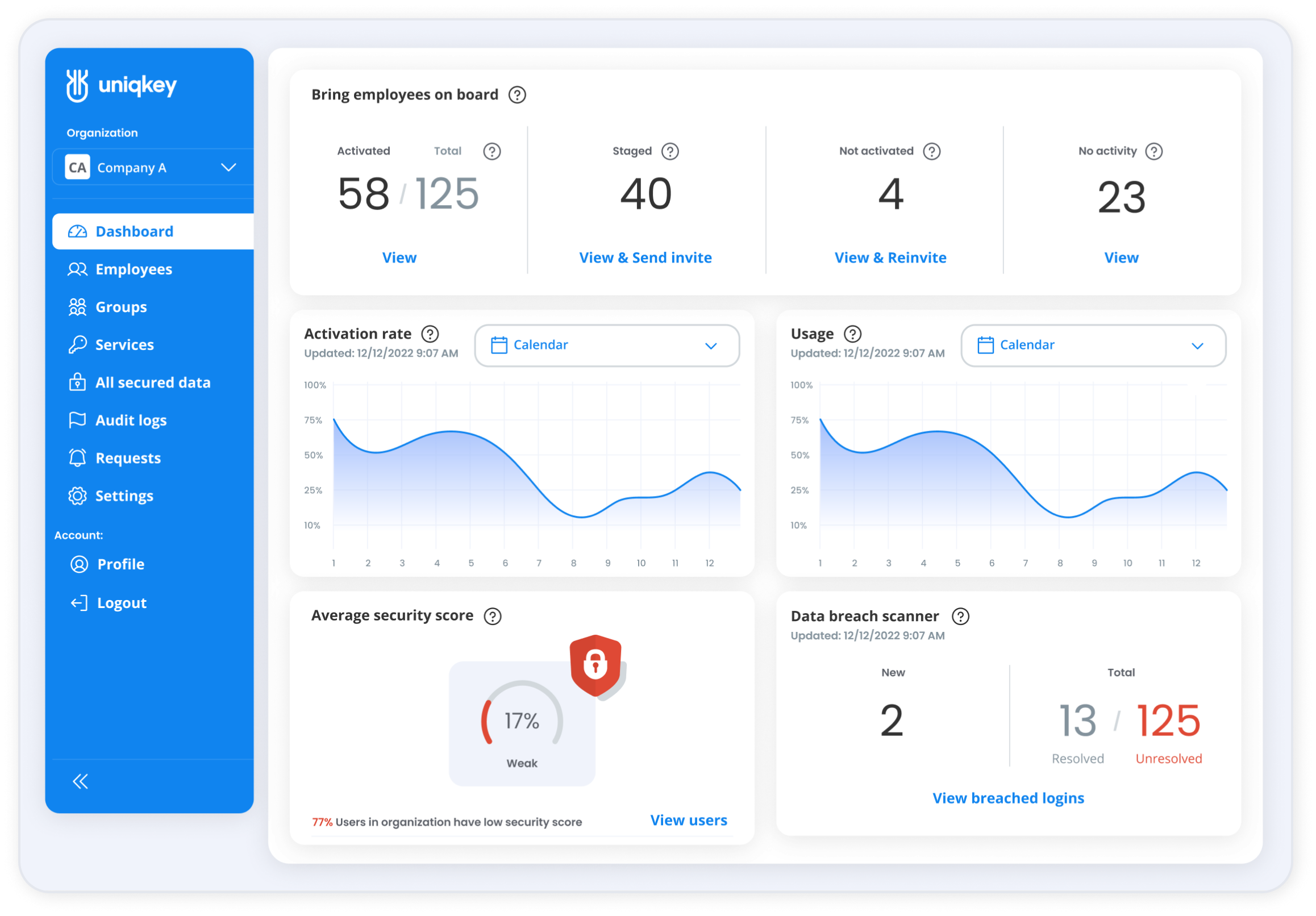
Current first-gen Dashboard:

Risks of Inefficient admin management

Increased risk
of data leaks

Vulnerability
to cyberattacks

Low productivity and wasted time

Non-compliance with security policies

Financial and
legal consequences
DOES THIS DASHBOARD MEET USERS NEEDS?

Feedback from users regarding
the Dashboardand the admin panel
in general:
Systems
Administrator
Relevant information is not always visible on the dashboard. More customization options are needed
to display data according to company priorities and roles.
Compliance
Officer
I don’t fully understand how to
improve the Average Security score.
The interface doesn’t provide clear guidance on how to enhance these metrics.
HR
Manager
The admin panel is quite complex
to use, which takes up a lot of time when managing employees and access to services. More intuitive settings would be appreciated.
System
Administrator
The widgets put an additional
load on the system, which sometimes
leads to slow performance.
The system could run faster.
Security Operations
Manager
The widgets on the dashboard appear
too bulky, making it difficult
to perceive important information.
There are also challenges with data configuration, and the setup process takes longer than expected.
Heuristic Analysis of the Dashboard
User feedback wasn't collected immediately, but complaints about the complexity of operations without clear explanations were noted.
My task was to update the outdated system to a more intuitive one. To identify key usability issues, I used
a component-based approach with heuristic design.
Visibility of System Status
Help Users Recognize, Diagnose,
and Recover from Errors
Errors do not include detailed explanations, messages lack informativeness, and hints
are not noticeable enough.
Consistency and Standards
Widgets are divided into different colors, but without a clear purpose. This only confuses users and distract their attention, making information harder to process.
Error Prevention
The interface does not indicate which metric poses a threat and which is potentially dangerous.
Help and Documentation
Help materials are placed in
an inconvenient location, and instructions are too small and difficult to notice, making it harder to find the necessary information.
Aesthetic and Minimalist Design
Large panels and bulky shapes with excessive spacing take up valuable space, forcing users to scroll unnecessarily and get distracted
by irrelevant details.
User Control and Freedom
Widgets do not allow users to delve deeper into the data or quickly edit parameters, making information management more difficult.
Recognition Rather Than Recall
No tooltips appear when hovering over functional panels, forcing users to return to onboarding
or spend extra time navigating
the page.
Flexibility and Efficiency
The lack of flexible navigation within the dashboard complicates
and prolongs the administrator's ability to assess and manage
the system efficiently.
03
Discovery and Research
Description of interface elements added based on heuristic findings to enhance usability:

THE IMPACT OF UX IMPROVEMENTS
User satisfaction with NextGen increased by 26%,
leading to a boost in sales (support data);
Direct impact: Improved UX solved key issues:
navigation, Security Score, critical data visibility.

26%
DEEP UPGRADE
Further improvements, including a reevaluation
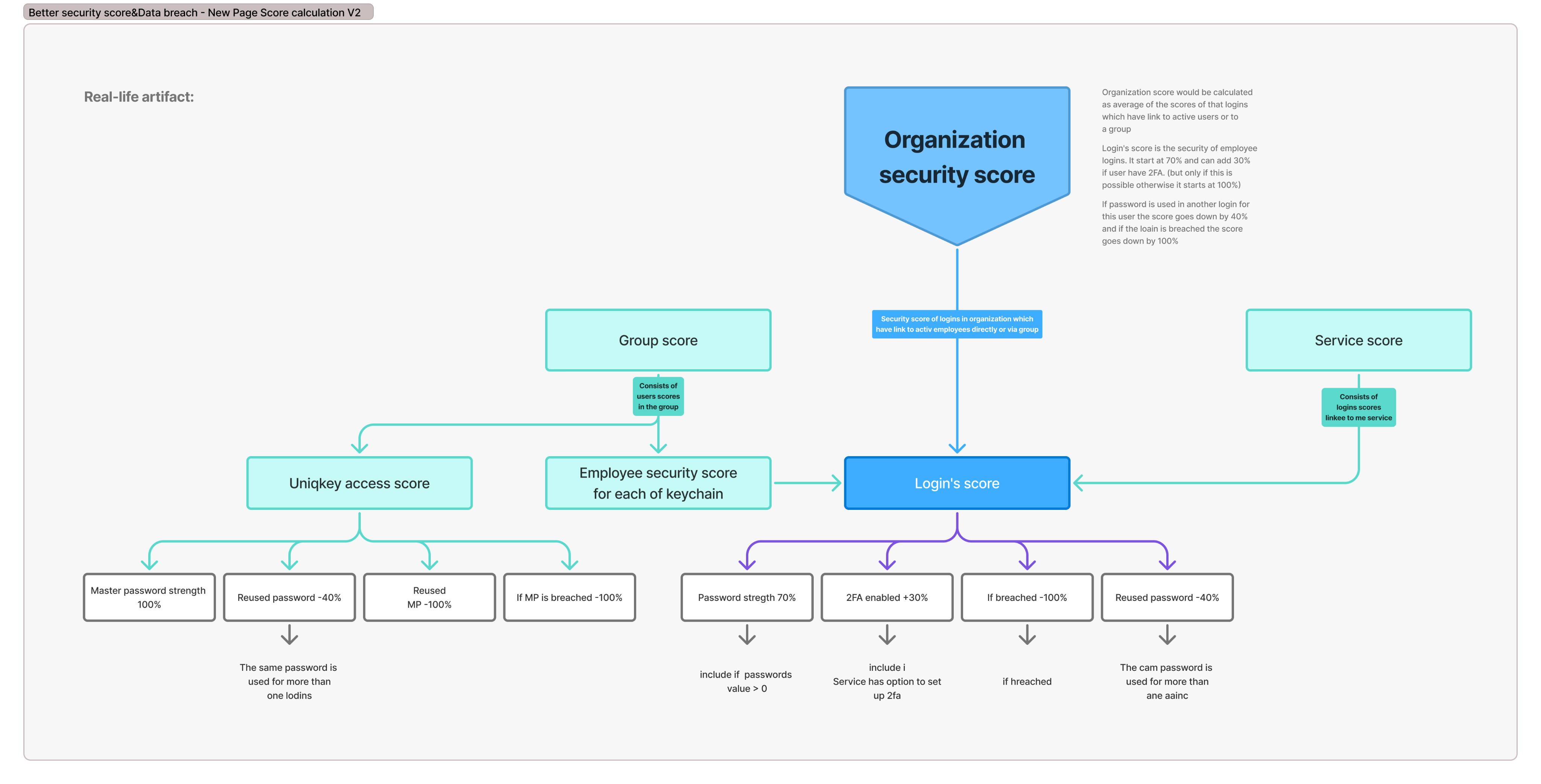
of the Security Score for greater accuracy
Identified Issues
Security Score logic needed optimization. Critical information was not easily accessible. Key risk factors were not fully reflected:
Required Improvements
Reassessment of Average Security Score calculation.
Greater transparency in displaying security status for:
04
SOLUTION OF THE SECOND ITERATION
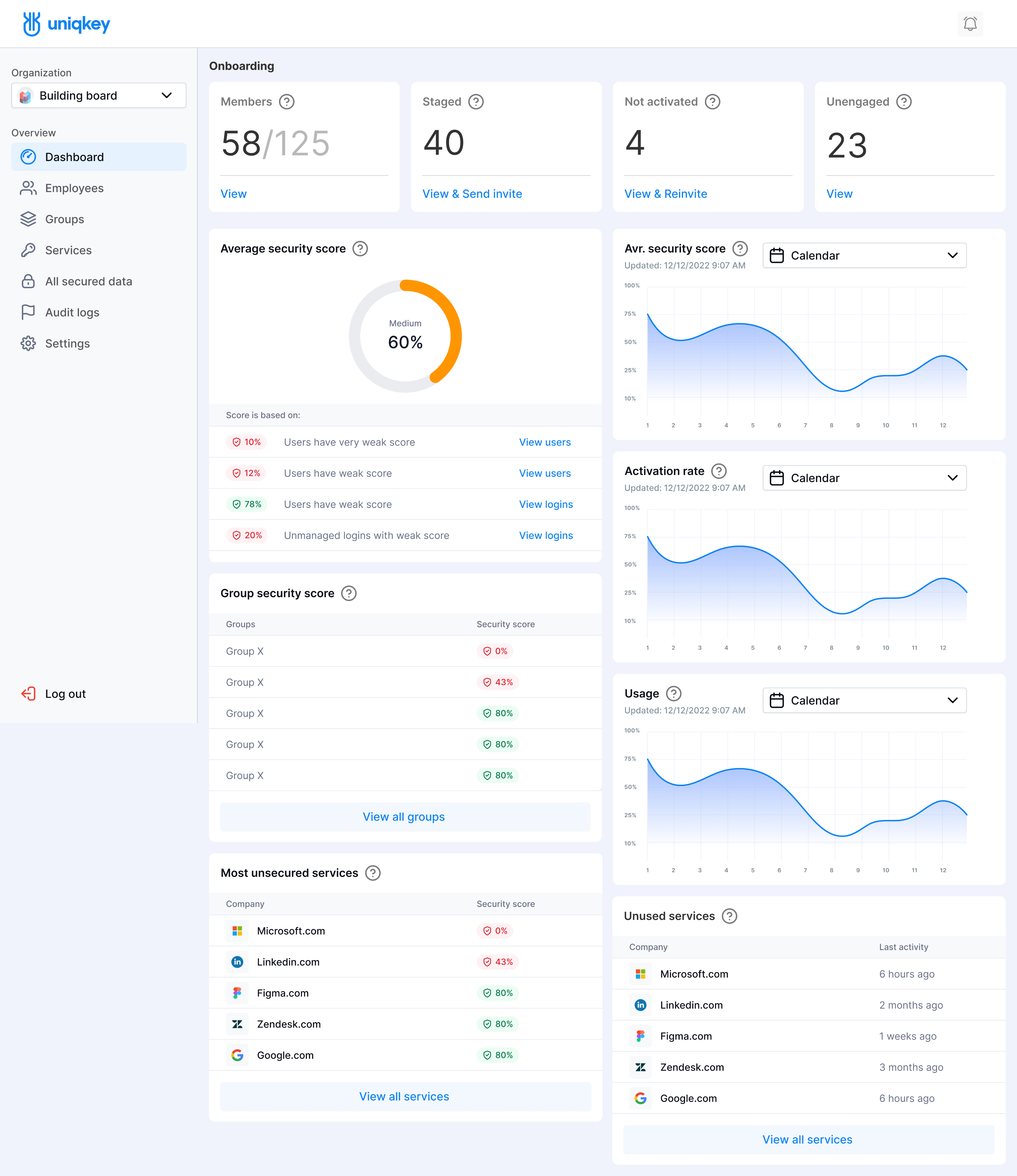
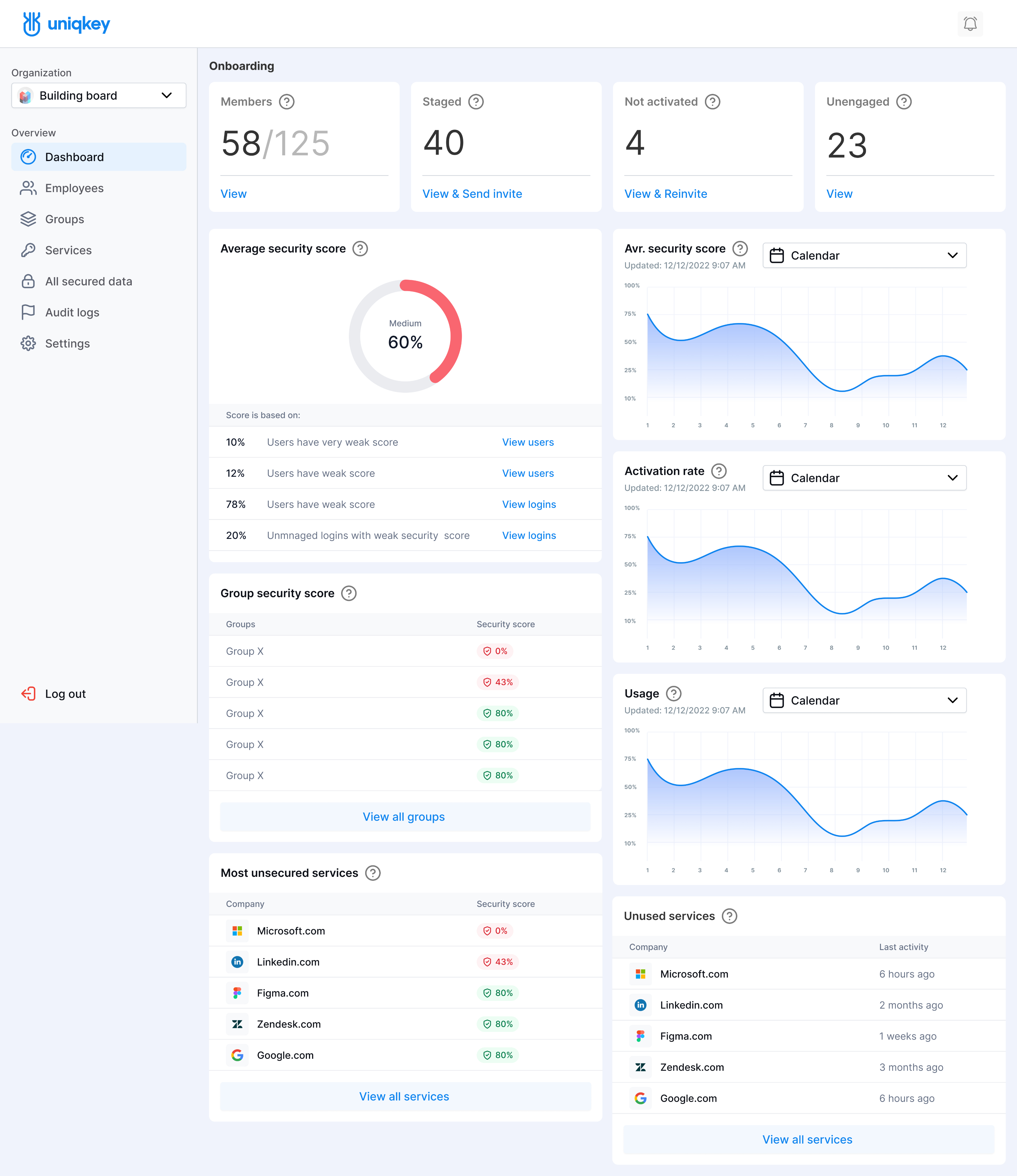
The business aimed to elevate the design's status and enhance UX by making the Security Score and dashboard graphs more intuitive.

RESULTS

Compact layout
Faster situation assessment

Clearer navigation
Improved management efficiency.

Refined style
A calmer, more formal interface.
05
TECHNICAL PART

The first dashboard and admin panel were built using a UI Kit based on Atomic Design, which later evolved into a full-scale Design System.
Through iterations, scaling, and developer collaboration, it became the core component library for all future platforms.
The second iteration improved flexibility by integrating lessons learned from the first version, ensuring a more adaptable and efficient system.
DESIGN SYSTEM STRUCTURE
The system was divided into two main blocks, including Development Integration
Foundaion
Core stylistic principles
Components
UI component library
Development Integration


This update significantly improved team efficiency, streamlined UI updates, and enhanced collaboration between designers and developers.
06
IMPACT OF NEXTGEN LAUNCH
Recognition and financial growth:
Increased demand for services.
35% increase in annual revenue after product update.
Client base expansion:
New corporate clients from across Europe.
Expansion beyond Scandinavia, increasing mark.
35%

USER FEEDBACK:
95%
Of users found the dashboard
easier to navigate
80%
Appreciated color-coded
critical info for faster decisions
85%
Improved Security Score revealed vulnerabilities
and enhanced security.
Awards

STREAMLINE UX
FOR 2FA AND SECURITY
Companies constantly face cybersecurity threats like phishing and credential theft. Push-based authentication mitigates these risks by replacing manual logins with a one-tap approval on a trusted device, reducing credential compromise and password fatigue.

In this case study, I showcase how I refined Uniqkey's mobile app UX to streamline authentication and enhance secure access management.
The main use cases remain unchanged, covering 90% of app usage, but targeted UI improvements will enhance the overall user experience.


01
DISCUSSION
WITH STAKEHOLDER
Before starting the Next-Gen update, I discussed the approach with stakeholders. The business team wanted all services on the main screen,
but I argued for a more focused UI to avoid unnecessary clutter.
A user flow study confirmed that users primarily need essential data.

Prioritized essential elements
to prevent overload

Gradual rollout of filterin
and sharing options

Allowed to control access
with time restrictions

Introduced changes step
by step for easier adoption

Reduced cognitive load while
improving control and efficiency
02
DISCOVERY AND RESEARCH
Analysis of the current interface according to heuristic evaluation.
CURRENT INTERFACE

Lack of grouping
or prioritization of data.
The visual structure does not meet modern UX standards. Due to the heavily loaded feed, users may easily get confused.
Hidden and overloaded menu.No quick access to important functions.
The search field is hidden and barely noticeable. No indicator of an active filter or category.
"All passwords"
looks like text rather than a selector.
No filters or categorization.The user cannot quickly switch between
data categories.
No clear categorization of data, making it harder to perceive. Data elements look identical, making navigation difficult.
Pain Points for Users
Undefined App
State on Launch
Users expected to see an immediate login request popup upon opening the app. Instead, they were presented with a list of saved services in the first few seconds, causing confusion.
Unclear Steps When Missing
Push Notifications
If users missed a push notification,
they hadto manually trigger it again.
This resulted in receiving all missed notifications at once, with the relevant
one buried at the bottom, increasing cognitive load and delaying access.
Lack of Clear Visibility
for Important Updates
Users struggled to find security-related changes, check access to stored passwords,
or manage permissions efficiently.
ADDITIONAL FEATURES FOR PRODUCT ENHANCEMENT
Improving security and expanding functionality within the current scope.
Optimizing the authentication
process for fast and intuitive confirmation via mobile, ensuring
seamless user access to the service.
Improving push notifications,
ensuring that every action or status change is accompanied by a notification, keeping users updated with
the latest security changes.
Introducing new features,
such as adding payment cards and notes, improving data filtering and sorting for better management of sensitive information.
Adding different access levels,
allowing more flexible permission management and restrictions, enhancing security and control over data.
Enhancing app navigation
by implementing a bottom navigation
menu for easier access to core features like the Security Dashboard, profile management, and access settings.
Implementing onboarding
to introduce users to the process,
as it was previously absent.
This will help them understand key actions
and discover new features efficiently.
03
CONCEPT OF THE FIRST ITERATION
Incorporated user feedback, business needs, and additional features, based on design heuristics insights.
Heuristic evaluation of a new result:
This reorganization improves visual hierarchy, provides a better understanding of the situation, and allows users to view data immediately without extra steps.
Introducing a bottom menu ensures convenient access to key features like "My Storage", "QR Scanner,"
and "More," improving navigation
and tool accessibility.


This notification now shows not only access requests from the user’s own requests but also from administrators and colleagues.
The progress bar on the start screen helps new
users track how different app features work, while experienced employees can stay informed about new functionalities, reducing stress and making
the process more manageable.

The progress bar on the start screen helps
new users track how different app features work, while experienced employees can stay informed about new functionalities, reducing stress
and making the process more manageable.
Push notifications now provide clear feedback after every status change or action, keeping users updated without the need to check manually.


New access and permission management features: Advanced access control allows administrators
to configure user permissions, enhancing security levels.
Visibility of system status
Clearly visible search field.Added filter button in the upper right corner. Clear and understandable tab:
(Logins, Payments, Secure Notes).
Match between system and real world
Improved categorization (clear section headings). Tabs align with user expectations for data types.
Improved data grouping. Prioritization
of important records in the "Most used" section.
Aesthetic and minimalist design
Well-organized content with clear separation by type. Minimalist and functional design of elements.
Flexibility and efficiency of use
Bottom navigation menu enables quick app navigation. Added icons for easier visual perception.
User control and freedom
Users can quickly switch between tabs. Added filtering functionality.
Consistency and standards
Visual structure is now more organized.Clear status indication for each entry
(lock icon, icons, etc.).
Error prevention
Clearly marked category areas.Visual separations between sections
improve orientation.

Before


After


Recognition and financial growth:
After the first iteration, users were less confused and found the necessary information faster.
+40%
Found information faster,
and satisfaction level increased
+20%
Users did not notice any changes
but had no complaints

04
UI UPDATE FOR B2B AUDIENCE
Given the success of the updated navigation and functionality, the company
decided to refresh and modernize the UI design, adapting it for the B2B segment.
The primary requirement is a formal, restrained style that better aligns with
the expectations of corporate clients.

Eliminate B2C associations:
bright colors, rounded elements

Reduce visual noise to enhance
focus on key functions

Use a minimalist color palette
and clear typography
SOLUTION OF THE SECOND ITERATION
Filtering and item selection flow.


05
Impact of nextgen launch
Sales
Growth
pdates to functionality and design
have contributed to increased sales, indicating higher user satisfaction
and product competitiveness.
Expansion into
European Markets
In 2024, Uniqkey successfully entered new European markets beyond the Scandinavian region, strengthening its presence and influence in the cybersecurity sector.
Participation in
International Events
The product has been showcased at several prestigious cybersecurity summits, enhancing its recognition and credibility among industry professionals.
FIXING THE COMMUNICATION
BETWEEN ADMINS AND EMPLOYEES
As part of the project to enhance communication between admins and employees,
I worked on developing a secure data access system by improving access sorting and organization. My task was to create an intuitive and secure infrastructure for company employees, ensuring they have access to the necessary data to perform their job tasks.

Admin Use Cases:
Employee Use Cases:
01
PROBLEM STATEMENT
The support manager shared their observations and user feedback.
Employees report frustration with managers providing duplicated or unnecessary information, leading to confusion
and inefficiency.
The lack of structured access results in data overload, making it difficult for employees to find relevant information quickly.
A more organized solution is needed to streamline data distribution and improve usability.
02
PROBLEM STATEMENT
Existing method of providing employees with security data
User Feedback – Admin:
HR
Manager
Access distribution via groups helps quickly set up access for new employees. However, the data lists are too broad—accountants see more than they need, and
it's not possible to grant access individually. We need more flexible access settings
for different roles.
System
Administrator
The admin panel is easy to understand, but it lacks the ability to create subgroups or fine-tune access to critical data. This forces us to create extra groups, complicating management.
A more flexible access hierarchy would be helpful.

User Feedback – Employee:

Accountant
I have access to all the department’s financial data,
but most of it isn’t needed.
To find the right password,
I have to scroll through long lists, which wastes time and distracts from work. I'd prefer more accurate access to what
I actually use.
Head of Finance
Relevant information is not always visible on the dashboard. More customization options are needed
to display data according to company priorities and roles.
Insights research
To gain deeper insights into the issues, we conducted an alignment discussion with the product and business teams. Based on the findings, I created the following CJM.

The CJM reveals inefficiencies in data access:
Admins face unclear requests and redundant tasks, while employees struggle with disorganized information. Solutions include better structuring, multi-level access, filters, and breadcrumb navigation to improve efficiency and clarity.
COMPETITIVE UX BENCHMARKING
While working on the product, I researched competitors to understand common UX patterns for B2B. I tested and refined competitors mechanisms so that administrators transitioning to our product could easily adapt to a familiar UX pattern, as the UI is intuitively similar.


This comparative analysis revealed that for deeper structuring, the existing functionality needs to be expanded without radical changes. The best solution is to maintain the current structure, as seen in competitors, but with the ability to create subgroups within groups, allowing administrators to organize data more thoroughly.
USABILITY HEURISTICS
The research conclusion highlights the application of three key usability heuristics that will directly impact the convenience and effectiveness of working with data.
This solution improves UX while making the product intuitive and easier to maintain.
USER CONTROL AND FREEDOM
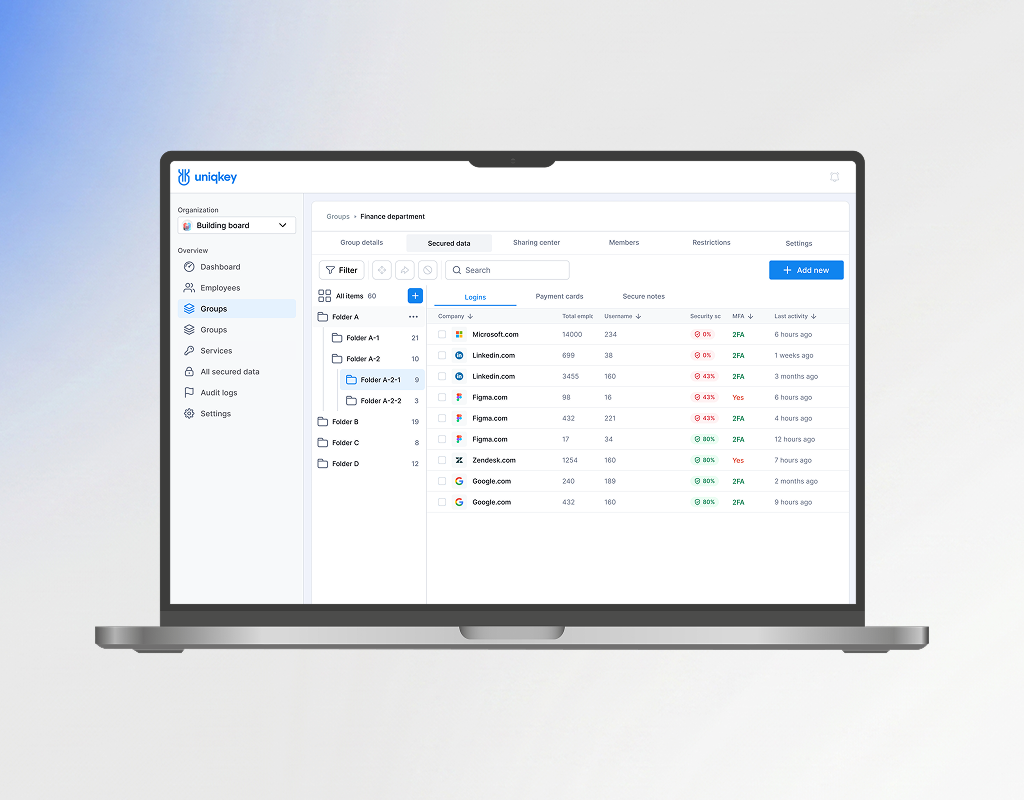
Folders with subtabs give administrators flexibility in organizing data, allowing
the system to be tailored to their needs.
SIMPLICITY AND MINIMALISM
A single 'Secured data' tab with centralized management enhances convenience and reduces cognitive load, making the interface clearer.
CONSISTENCY AND STANDARDS
Users expect logically grouped information,
not scattered across tabs, which speeds
up access and reduces errors.
EXPECTED OUTCOMES
Admins can organize data in detailed,
multi-level groups
Employees quickly find necessary
data without being overloaded
The company reduces access
confusion and enhance security

03
CONCEPT OF THE FIRST ITERATION
I sketched several drafts and arrived at a simple
yet familiar solution - an optional panel with folders.


IMPLEMENTATION & RESULT
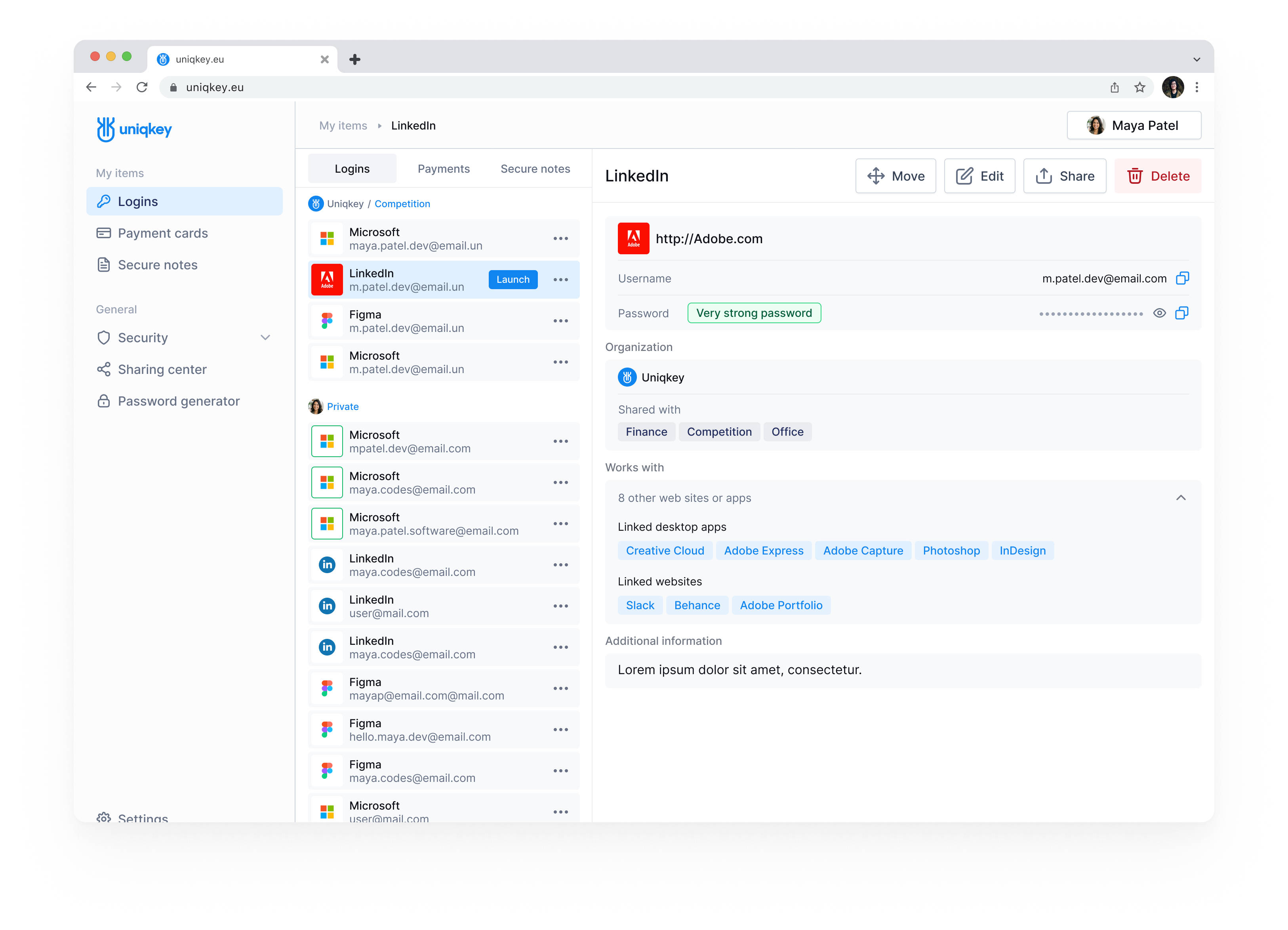
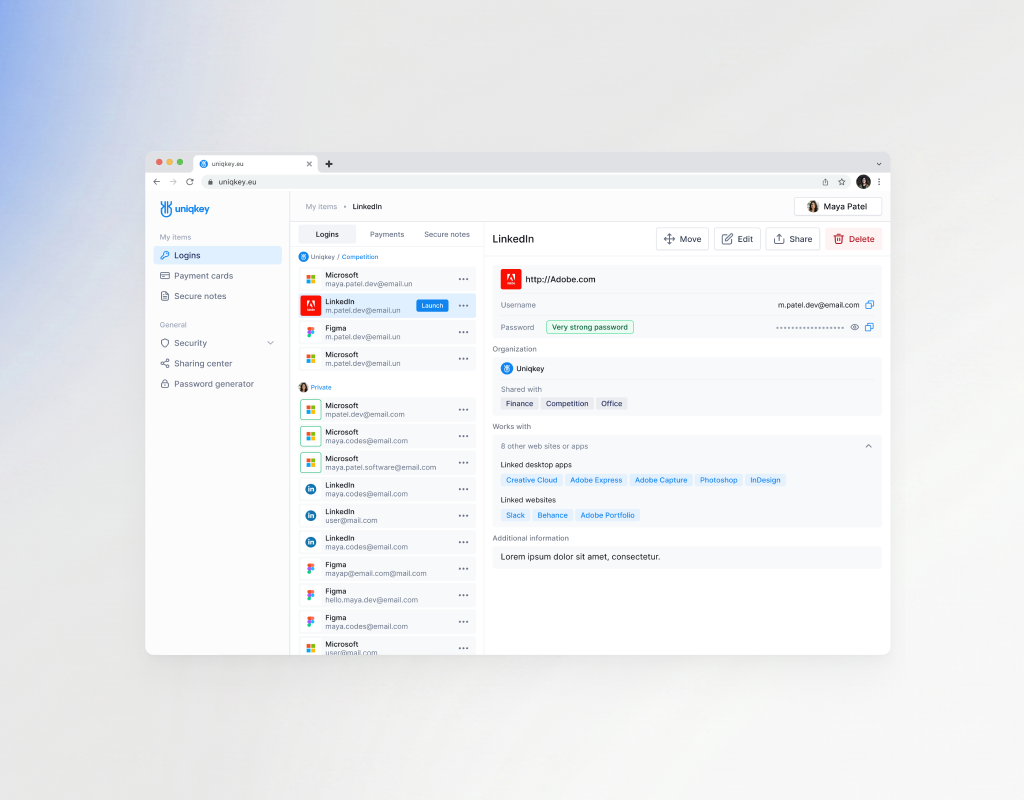
The admin panel was updated with enhanced data structuring, consolidating "Logins," "Payment Cards," and "Secure Notes" into a single "Secured Data" tab with a folder management panel. This allows efficient organization and access control for departments and employees. In the "Employees" tab, admins can now view available secured data by groups and subfolders.
Before

After

THE IMPACT OF UX IMPROVEMENTS
The update streamlined secure data management, reducing complaints by nearly 38% while enhancing admin efficiency. Employees can still access data seamlessly, now in a more structured and personalized way, balancing optimization with a smooth user experience.
+38%

04
SOLUTION OF THE SECOND ITERATION STATEMENT
COMPETITIVE UX BENCHMARKING
The updated data management approach proved successful, prompting leadership to revise the visual style. The goal was a restrained, formal design better suited for B2B. Vibrant colors and rounded elements felt more B2C, leading to a redesign with a minimalist palette, clear typography, and reduced decoration.

This made the interface more professional and prestigious. Additional research on market trends, competitors, and B2B design was conducted.
As a result, the next design iteration was developed.
RESULTS

-32%

-27%
The redesigned interface and improved data sorting significantly boosted admin efficiency, cutting login search time by 32% and reducing support requests by 27%.
05
IMPACT OF NEXTGEN LAUNCH
Cut Search Time
32% ↓
Reduced Support Requests
27% ↓
Higher User Satisfaction
↑ 72%
The minimalistic UI, refined typography, and subtle color palette enhanced trust among corporate clients. Research shows that 72% of B2B companies prefer clean, functional UI, linking it to stability and security.

As a result, these improvements not only elevated user satisfaction but
also strengthened Uniqkey's market position among top cybersecurity players.

Live Design Files:
The real work space with a messy kitchen. Iterations, rejected concepts, and the evolving design system in Figma.
Explore Admin Portal WIP:
Working files, flows, and iterationsExplore Mobile App WIP:
Working files, flows, and iterationsDesign System:
Components, styles, and tokens

Reviews
Sanne Øst
Chief Product Officer
Roman is a very creative person. We worked together on the design of a password management application and came up with a great solution that was successfully launched. Roman loves to research the market and is always full of creative ideas.If you need fresh and unique eye on your product - Roman is the right person.
View

Ready to architect your next product?
Open for complex challenges and leadership roles.
Select time to call and Hire Me below.

Book a Call